Note
Go to the end to download the full example code.
3. Figure elements
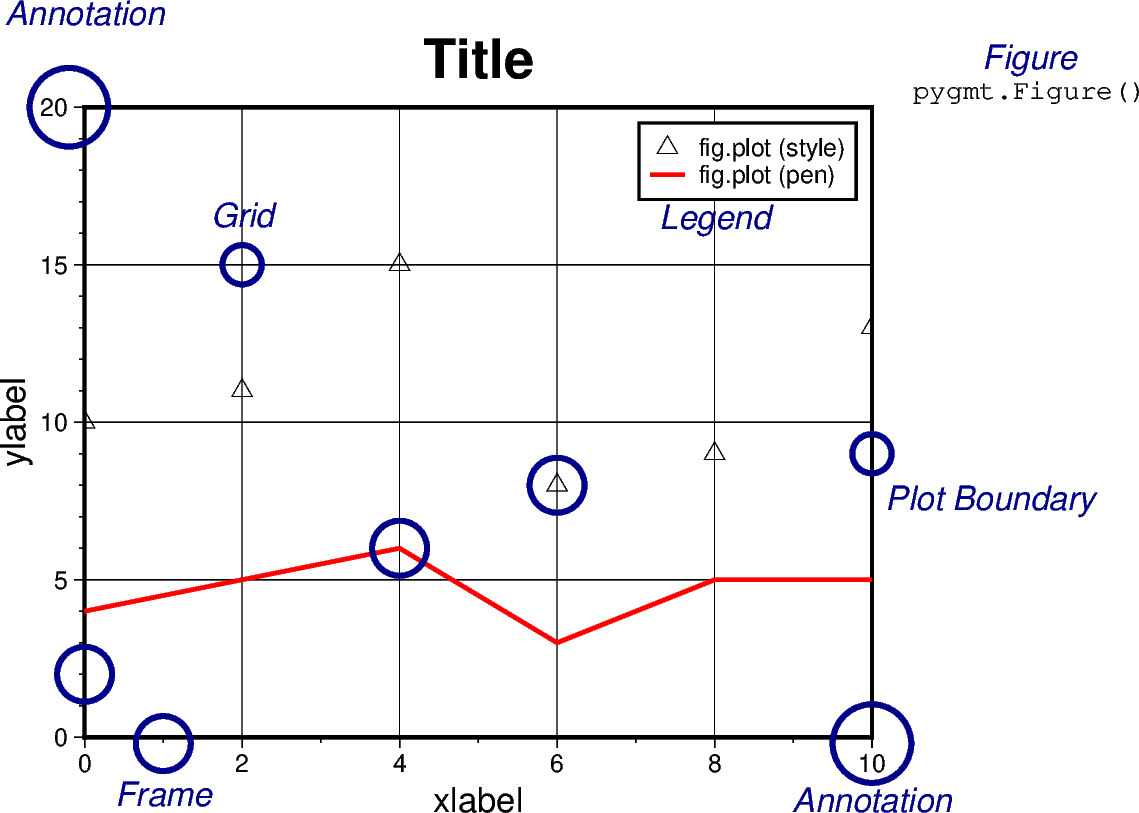
The figure below shows the naming of figure elements in PyGMT.
import pygmt
from pygmt.params import Axis, Box, Frame, Position

fig = pygmt.Figure()

x = range(0, 11, 2)
y_1 = [10, 11, 15, 8, 9, 13]
y_2 = [4, 5, 6, 3, 5, 5]

fig.basemap(
    region=[0, 10, 0, 20],
    projection="X10c/8c",
    frame=Frame(
        axes="WSrt",
        title="Title",
        xaxis=Axis(annot=2, tick=1, grid=2, label="xlabel"),
        yaxis=Axis(annot=5, tick=1, grid=5, label="ylabel"),
    ),
)
fig.plot(x=x, y=y_1, style="t0.3c", label="fig.plot (style)")
fig.plot(x=x, y=y_2, pen="1.5p,red", label="fig.plot (pen)")

mainexplain = {"font": "12p,2,darkblue", "justify": "TC", "no_clip": True}
minorexplain = {"font": "10p,8", "justify": "TC", "no_clip": True}
# ============ Figure
fig.text(x=12, y=22, text="Figure", **mainexplain)
fig.text(x=12, y=20.8, text="pygmt.Figure()", **minorexplain)
# ============ x-majorticks
fig.plot(x=10, y=-0.2, style="c1c", pen="2p,darkblue", no_clip=True)
fig.text(x=10, y=-1.6, text="Annotation", **mainexplain)
# ============ y-majorticks
fig.plot(x=-0.2, y=20, style="c1c", pen="2p,darkblue", no_clip=True)
fig.text(x=0, y=23.4, text="Annotation", **mainexplain)
# ============ x-minorticks
fig.plot(x=1, y=-0.2, style="c0.7c", pen="2p,darkblue", no_clip=True)
fig.text(x=1, y=-1.4, text="Frame", **mainexplain)
# ============ y-minorticks
fig.plot(x=0, y=2, style="c0.7c", pen="2p,darkblue", no_clip=True)
# ============ Grid
fig.plot(x=2, y=15, style="c0.5c", pen="2p,darkblue")
fig.text(x=2, y=17, text="Grid", **mainexplain)
# ============ Plot Boundaries
fig.plot(x=10, y=9, style="c0.5c", pen="2p,darkblue", no_clip=True)
fig.text(x=11.5, y=8, text="Plot Boundary", **mainexplain)
# ============ fig.plot (style)
fig.plot(x=6, y=8, style="c0.7c", pen="2p,darkblue")
# ============ fig.plot (pen)
fig.plot(x=4, y=6, style="c0.7c", pen="2p,darkblue")
# ============ Legend
fig.legend()
fig.text(x=8, y=16.9, text="Legend", **mainexplain)

fig.show()
3-D plot example
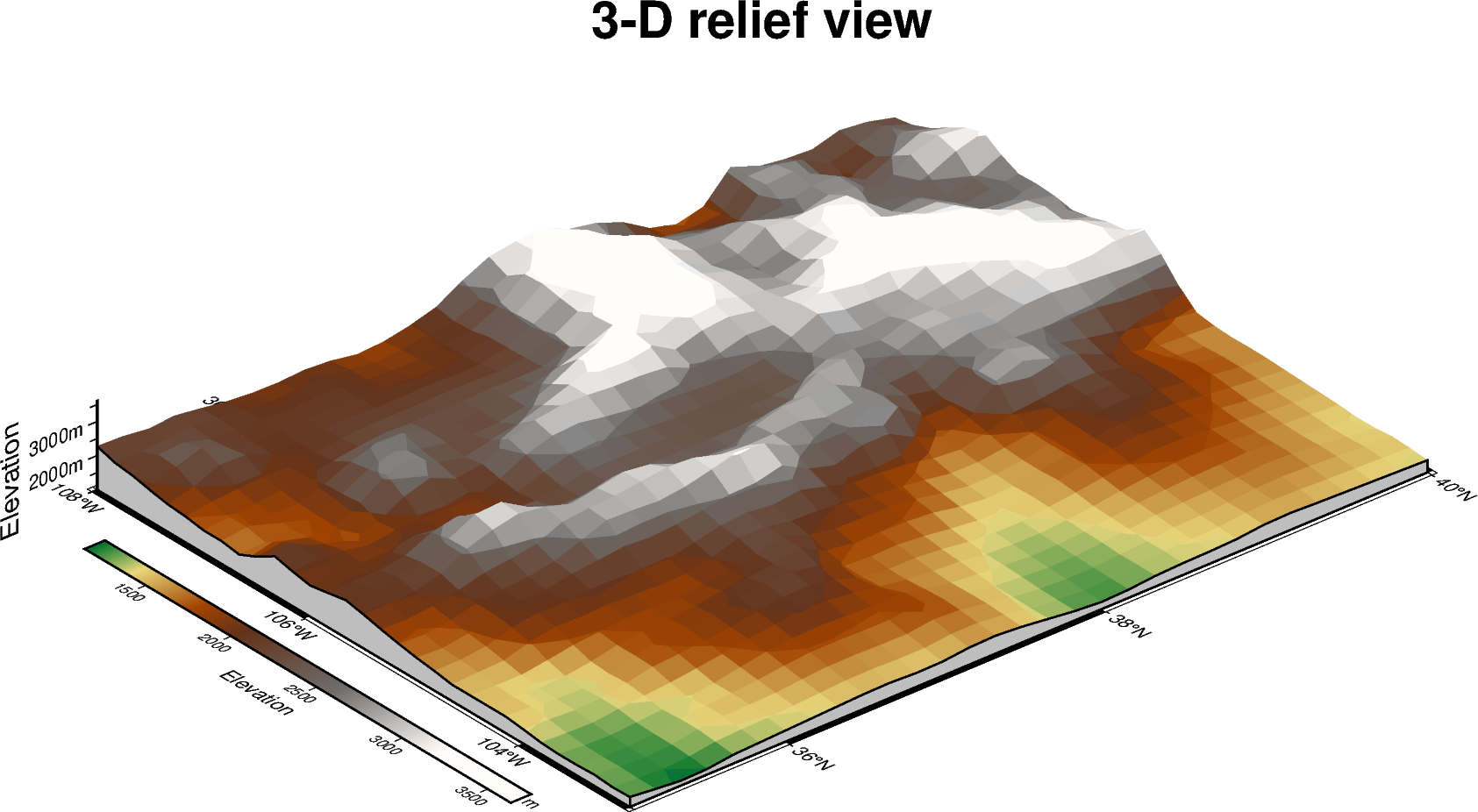
Figure elements are also important in 3-D views. Here we use a perspective plot of Earth relief and add a title, axis annotations, and a colorbar aligned with the 3-D view.
grid = pygmt.datasets.load_earth_relief(
    resolution="10m", region=[-108, -103, 35, 40]
)

fig = pygmt.Figure()
fig.grdview(
    grid=grid,
    projection="M12c",
    perspective=[130, 30],
    zsize="1.5c",
    surftype="surface",
    cmap="gmt/geo",
    frame=Frame(
        axes="WSnEZ",
        title="3-D relief view",
        xaxis=Axis(annot=True, label="Longitude"),
        yaxis=Axis(annot=True, label="Latitude"),
        zaxis=Axis(annot=1000, tick=500, label="Elevation", unit="m"),
    ),
    plane=1000,
    facade_fill="gray",
)
fig.colorbar(perspective=True, annot=500, label="Elevation", unit="m")
fig.show()
gmtread [NOTICE]: Remote data courtesy of GMT data server oceania [http://oceania.generic-mapping-tools.org]
gmtread [NOTICE]: SRTM15 Earth Relief v2.7 at 10x10 arc minutes reduced by Gaussian Cartesian filtering (52.4 km fullwidth) [Tozer et al., 2019].
gmtread [NOTICE]:   -> Download grid file [3.0M]: earth_relief_10m_g.grd
Subplot example
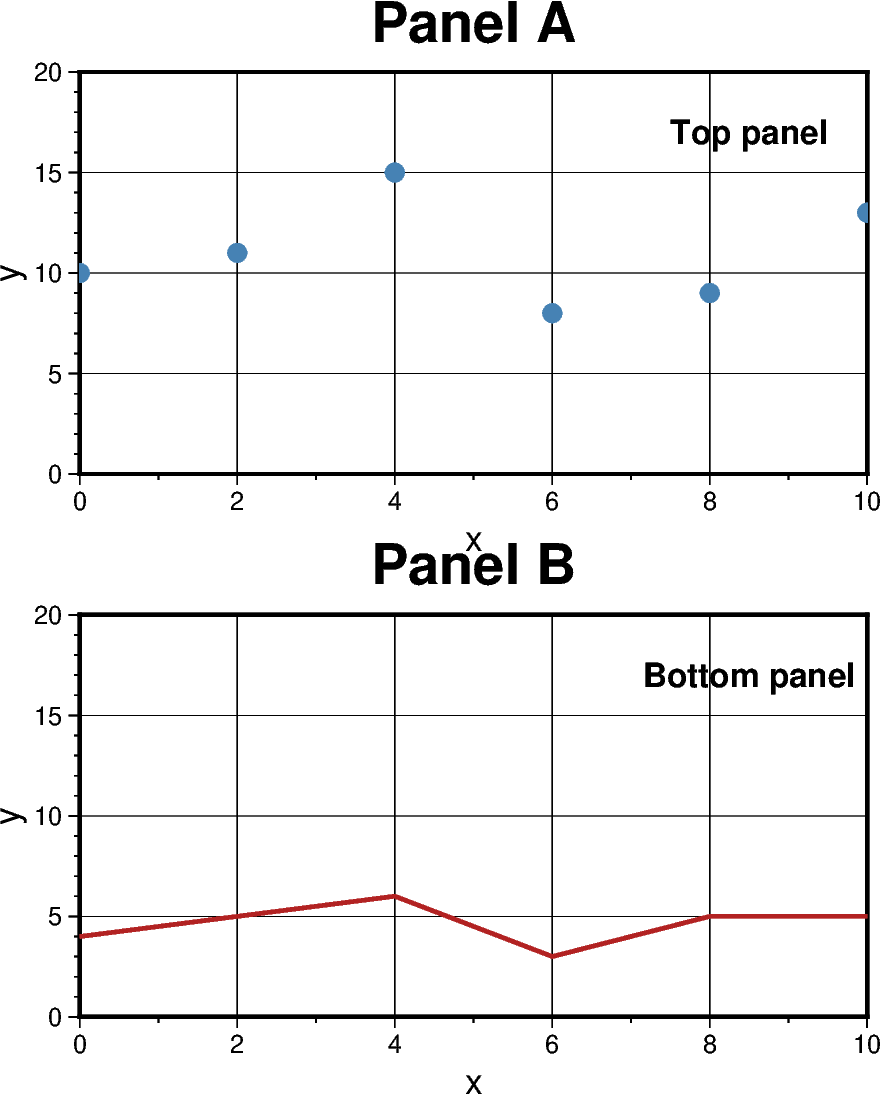
Figure elements can also be organized across multiple panels. The example below uses a 2x1 subplot layout, where each panel has its own title and frame annotations.
fig = pygmt.Figure()
with fig.subplot(
    nrows=2,
    ncols=1,
    figsize=("10c", "12c"),
    frame=Frame(
        axes="WSrt",
        xaxis=Axis(annot=2, tick=1, grid=2, label="x"),
        yaxis=Axis(annot=5, tick=1, grid=5, label="y"),
    ),
    margins="0.4c",
):
    fig.basemap(region=[0, 10, 0, 20], projection="X?", panel=[0, 0], frame="+tPanel A")
    fig.plot(x=x, y=y_1, style="c0.25c", fill="steelblue", panel=[0, 0])
    fig.text(x=8.5, y=17, text="Top panel", font="12p,Helvetica-Bold", panel=[0, 0])

    fig.basemap(region=[0, 10, 0, 20], projection="X?", panel=[1, 0], frame="+tPanel B")
    fig.plot(x=x, y=y_2, pen="1.5p,firebrick", panel=[1, 0])
    fig.text(
        x=8.5,
        y=17,
        text="Bottom panel",
        font="12p,Helvetica-Bold",
        panel=[1, 0],
    )

fig.show()
Geographic map example
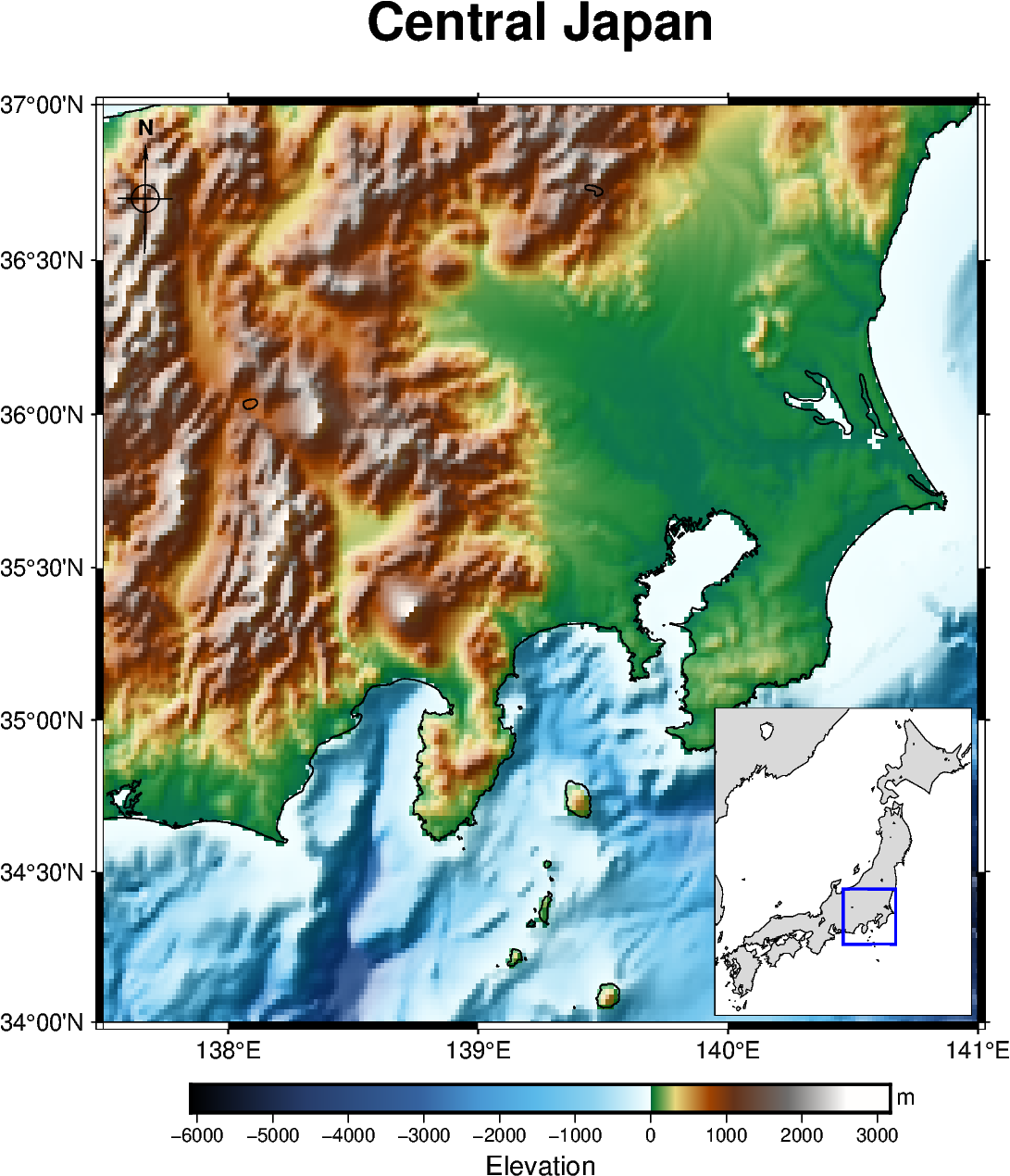
Figure elements are also commonly used on geographic maps. The example below uses Earth relief as the main map, then adds a colorbar, a directional rose, and an inset map to show where the study area is located in a broader regional context.
region = [137.5, 141, 34, 37]
grid = pygmt.datasets.load_earth_relief(resolution="01m", region=region)

fig = pygmt.Figure()
fig.grdimage(
    grid=grid,
    projection="M12c",
    cmap="gmt/geo",
    shading=True,
    frame=Frame(
        axes="WSne",
        title="Central Japan",
        xaxis=Axis(annot=True, label="Longitude"),
        yaxis=Axis(annot=True, label="Latitude"),
    ),
)
fig.coast(shorelines="0.5p,black")
fig.colorbar(annot=1000, label="Elevation", unit="m")
fig.directional_rose(
    position=Position("TL", offset=0.2),
    width="1.5c",
    labels=True,
)

with fig.inset(
    position=Position("BR", offset=0.1),
    box=Box(fill="white", pen="0.8p"),
    region=[129, 146, 30, 46],
    projection="M3.5c",
):
    fig.coast(land="gray85", water="white", shorelines="0.25p")
    fig.plot(
        data=[[region[0], region[2], region[1], region[3]]],
        style="r+s",
        pen="1p,blue",
    )

fig.show()
grdblend [NOTICE]: Remote data courtesy of GMT data server oceania [http://oceania.generic-mapping-tools.org]
grdblend [NOTICE]: SRTM15 Earth Relief v2.7 at 01x01 arc minutes reduced by Gaussian Cartesian filtering (5.2 km fullwidth) [Tozer et al., 2019].
grdblend [NOTICE]:   -> Download 30x30 degree grid tile (earth_relief_01m_g): N30E120
Total running time of the script: (0 minutes 5.598 seconds)